Letting your travel companions add photos
Send your travel companions a link. They don't need an account: they choose their photos on their phone and those arrive with you straight away, with their name on them.
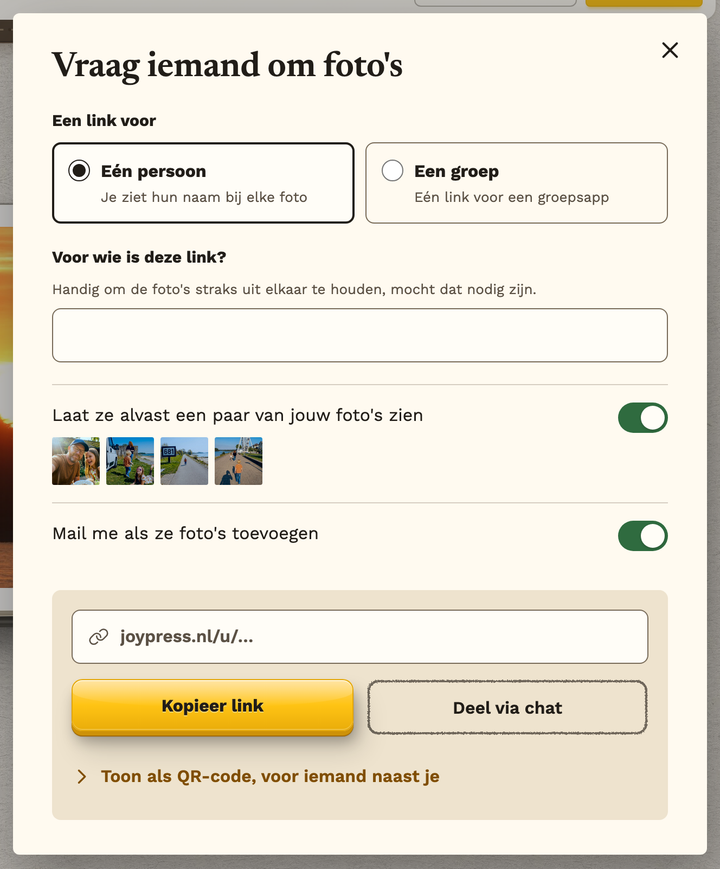
- Choose Add photos (in the menu, or on the desk) and then Ask your travel companions.
- Choose One person (then you see their name on every photo) or A group (one link for a group chat), and fill in who it is for.
- Send the link with Share via chat, copy it, or show the QR code to someone next to you.
- Want them to see a few of your photos first? That's on; you turn it off on the same screen.
You need an email address first
Without an email address a book is gone after seven days, and then the link stops working too.
How long does the link work?
Thirty days. Under Open invitations you see who opened it and who sent photos. That is also where you revoke a link: it stops working at once, and the photos already there stay. Want those gone too? Choose to hide all their photos as well.
What do they see?
Only the few photos you show them, if you turn that on. Never your book, and never other people's photos.
Still stuck? Mail us at help@joypress.nl. We usually reply within a day.